Fill your text document
A powerfull templating facility is included in jOpenDocument.
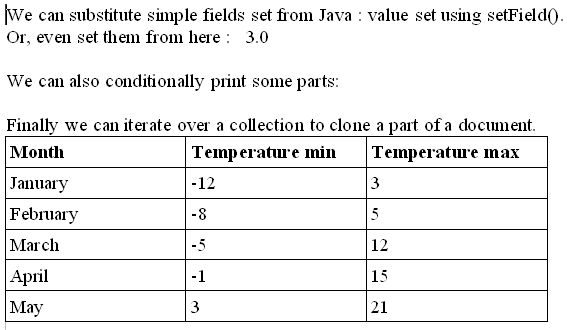
You start by creating a template file, directly in OpenOffice, with the help of the jOpenDocument AddOn.
It lets you quickly insert all the grey and green spans you see below.
File templateFile = new File("template/test.odt");
File outFile = new File("out.odt");
// Load the template.
// Java 5 users will have to use RhinoFileTemplate instead
JavaScriptFileTemplate template = new JavaScriptFileTemplate(templateFile);
// Fill with sample values.
template.setField("toto", "value set using setField()");
List<Map<String, String>> months = new ArrayList<Map<String, String>>();
months.add(createMap("January", "-12", "3"));
months.add(createMap("February", "-8", "5"));
months.add(createMap("March", "-5", "12"));
months.add(createMap("April", "-1", "15"));
months.add(createMap("May", "3", "21"));
template.setField("months", months);
template.hideParagraph("p1");
// Save to file.
template.saveAs(outFile);
// Open the document with OpenOffice.org !
OOUtils.open(outFile); |
|
Java2html
|
You start by creating a template.
You can then define values that you need in you document.
Either by using setField(), or by using showParagraph()/hideParagraph().
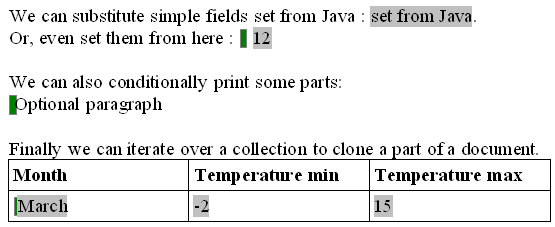
Finally you just call saveAs().
The final document will look like:
If you want to know more, look at the package org.jopendocument.dom.template